Digital business card · iPhone
Share your card in one scan. Keep every contact you make.
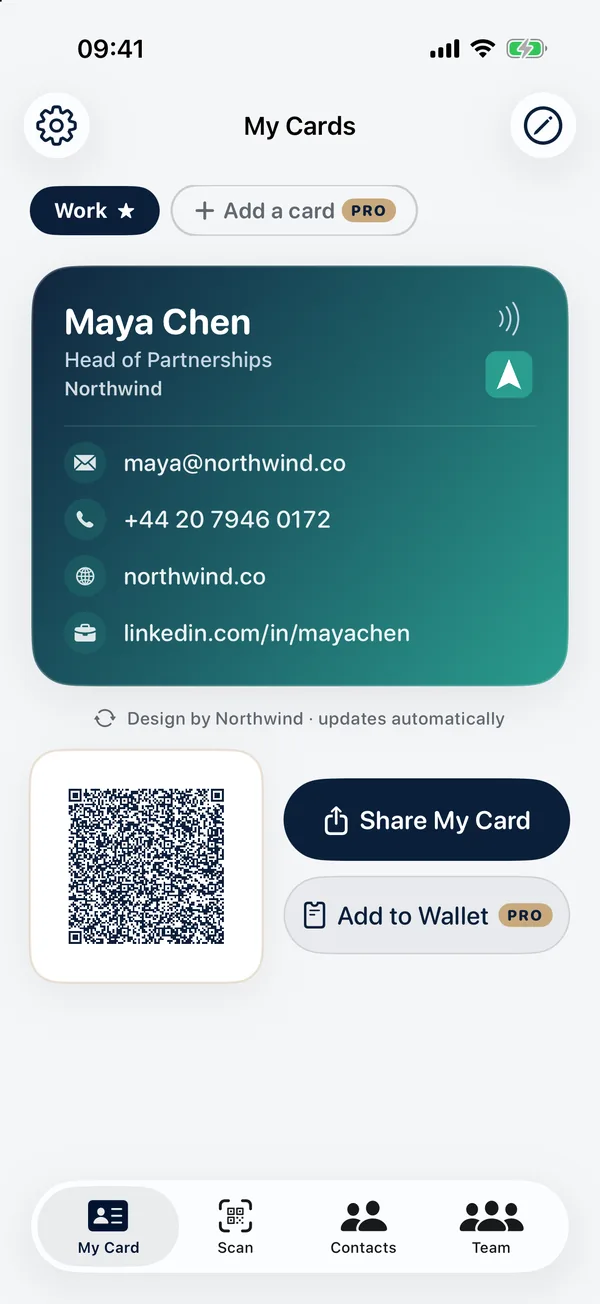
Make a card that looks like your company, share it with a QR code any phone camera can read, and scan the cards and badges you’re handed straight into your contacts. No account and no subscription — your details stay on your iPhone and in your own iCloud.
Coming soon to the App Store · Free to start · iOS 17+
- No account
- No subscription
- Works with any phone camera
- Your data stays in your iCloud
The difference
The person you meet doesn’t need the app.
Your QR code carries your details as a standard contact card, so any iPhone or Android camera offers to save you straight to Contacts — no app to install, no link to open, no website in between. AirDrop, Messages and email send the same contact card.
How it works
Three steps. Then you’re in their contacts.
- 1
Make your card
Pick a design, add your logo and photo, and fill in your details — or start from your own contact in one tap.
- 2
Share it
Show your QR code, or send it by AirDrop, Messages or email. A widget keeps it on your Home Screen and Lock Screen.
- 3
Get theirs
Scan their business card, event badge or QR code. The details are read on your iPhone and saved, with where you met.
Scanning & contacts
Every card you’re handed, kept.
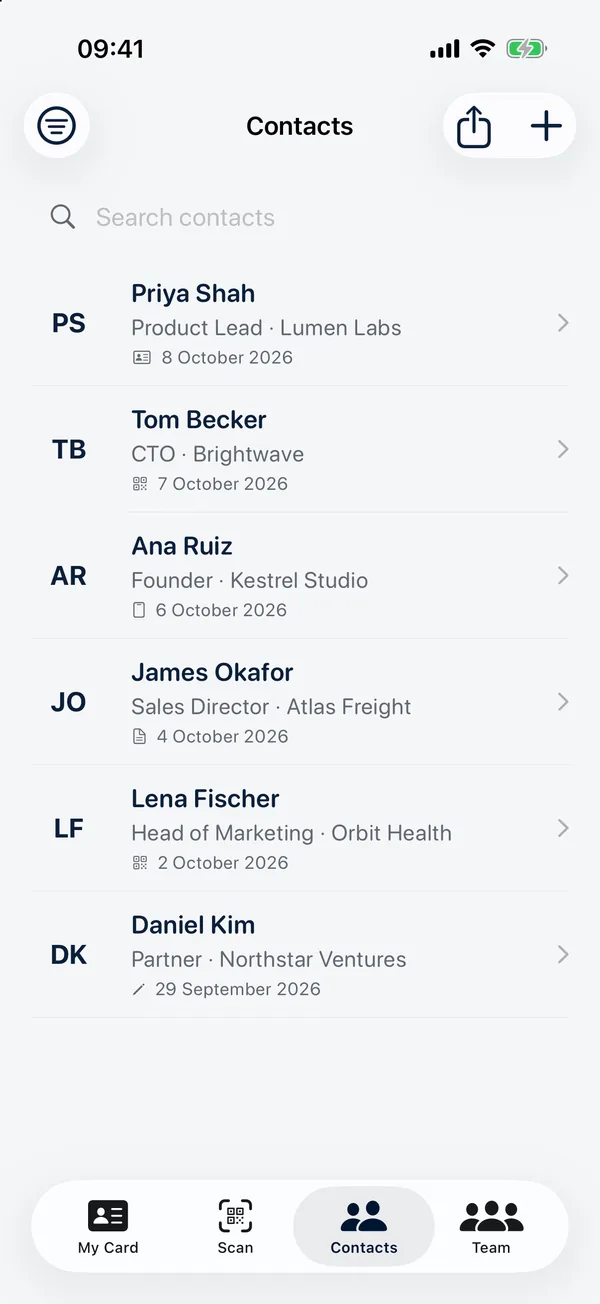
Point your camera at the card someone gives you and their details are read on your iPhone, ready to save — along with a photo of the card itself, so nothing on it is lost.
- Scan a business card, an event badge or a QR code
- Tag people, add notes and where you met
- Save them to your iPhone Contacts, or just in MeetVox Card
- Search, sort, filter — and export everything as a CSV
Teams · Pro
Give your whole team the same card.
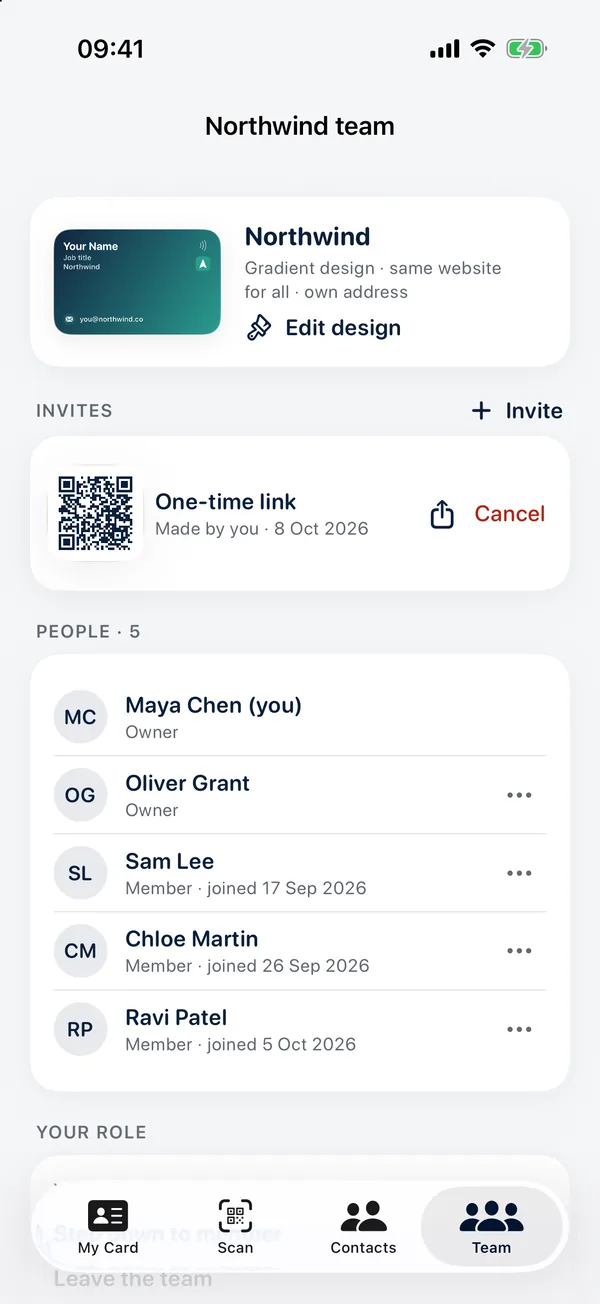
Make one card that looks right, then share its design — not your details — with your colleagues. Everyone looks like the same company, and each person keeps their own name, number and links.
- Turn your card into the company design in one step
- Invite each colleague with a one-time link or a QR code
- They add their own details; the logo, colours and company name are shared
- Change the logo and every card in the team updates automatically
- Owners invite and manage people; nobody’s contact details are shared
Everyone in a team needs MeetVox Card Pro — a one-time purchase.
Why MeetVox Card
No account. No subscription. No tricks.
No account
Open the app and make your card. No sign-up, no password, nothing to verify.
Free where it counts
Sharing, scanning, unlimited contacts, iCloud backup and four designs are free — for good.
One payment for Pro
More cards, every design, Apple Wallet and Teams for a single one-time purchase. Never a subscription.
Private by design
Your cards and contacts live on your iPhone and in your own iCloud. No analytics, no ads, no tracking.
Features
Everything a business card should have done all along.
Your card, how you share it, and what happens to the cards you’re given — plus a few things paper never could.
Your card
Looks like your company, reads like you.
- Six designs — Minimal, Bold, Gradient and Executive free; Glass and Photo with Pro
- Your photo, company logo and banner
- Email, phone, website, LinkedIn, address and pronouns
- Instagram, X, TikTok, YouTube, GitHub, WhatsApp, Calendly and more
- Your exact brand colours, saved as your own designs (Pro)
- A card for each role — work, personal, side project (Pro)
Sharing
However the other person likes to receive it.
- A QR code any phone camera reads — no app needed
- AirDrop, Messages and email, with a contact file attached
- Home Screen and Lock Screen widgets
- Siri and Shortcuts: “Share my card”
- Copy your details as text
- An Apple Wallet pass, one swipe from the Lock Screen (Pro)
Scanning & contacts
Every card you’re handed, kept and easy to find.
- Scan business cards, event badges and QR codes
- Details read on your iPhone; a photo of the card is kept
- Tags, notes and where you met
- Save to your iPhone Contacts, or just in MeetVox Card
- Search, sort and filter
- Export everything as a CSV
Teams
One design for the whole company (Pro).
- Turn your card into your team’s design
- Invite colleagues with one-time links or a QR code
- They add their own details; logo, colours and company name are shared
- Change the logo and every card updates automatically
- Several owners; only owners invite and remove people
- Nobody’s own contact details are ever shared
Pro
One payment, never a subscription.
- Unlimited cards
- Glass and Photo designs
- Your exact brand colours
- Apple Wallet pass
- Teams for the whole company
Backup & sync
Your data, in your iCloud.
- Backed up to your own private iCloud
- Synced to your other Apple devices
- Works fully without iCloud, too
- No account, no analytics, no ads
Privacy & trust
Your contacts are your business.
- iPhone — iOS 17 or later
The full detail is in the MeetVox Card privacy policy.
- No account and no servers of ours: your cards and contacts are stored on your iPhone.
- Backed up to your own private iCloud — which we can’t read — and synced to your other Apple devices.
- Cards and badges are read on your iPhone. Their photos aren’t uploaded anywhere.
- No analytics, no advertising and no tracking of any kind.
- Teams are the one exception: the shared design and the names of the people in a team sit in a shared area of iCloud. Nobody’s email, phone or links ever do.
- Delete everything from Settings at any time, and export your contacts as a CSV whenever you like.
Pricing
Free to use. Pro is one payment.
Sharing your card and keeping your contacts are free, for good. Pro adds more cards, every design, Apple Wallet and Teams — for a single purchase, never a subscription.
MeetVox Card
Free
Everything you need to share your card and keep your contacts.
Join the waiting list- One card in four designs
- Your photo, logo and banner
- QR code, AirDrop, Messages and email
- Unlimited scanning and contacts
- iCloud backup and CSV export
- Home Screen and Lock Screen widgets
Pro
one-time · £4.99 in the UK
For more than one role, and for teams that want one look.
Join the waiting listOne payment, never a subscription. Restores on your other Apple devices.
- Everything in Free
- Unlimited cards
- Glass and Photo designs
- Your exact brand colours
- Apple Wallet pass
- Teams: one design for the whole company
Paid through the App Store, in your local currency, tax included. No MeetVox account needed.
FAQ
Questions, answered
Does the other person need MeetVox Card?
No. Your QR code holds your details as a standard contact card, so any iPhone or Android camera can save you. AirDrop, Messages and email work the same way.
Is it a subscription?
No. MeetVox Card is free to download and use. Pro is a single one-time purchase ($4.99 in the US, £4.99 in the UK), and it comes back on your other Apple devices.
What’s free?
One card in four designs, your photo, logo and banner, sharing by QR code, AirDrop, Messages and email, unlimited scanning and contacts, iCloud backup, CSV export and the widgets.
What does Pro add?
As many cards as you like, the Glass and Photo designs, your exact brand colours and saved designs, an Apple Wallet pass, and Teams.
How do Teams work?
Turn your card into your company’s design and invite colleagues with one-time links. They add their own details; the logo, colours and company name are shared. Change the design and everyone’s card updates automatically. Everyone in a team needs Pro.
Is there an Android app?
Not yet — MeetVox Card is for iPhone. Your QR code still works with Android cameras.
Where is my data?
On your iPhone and in your own iCloud. We have no servers holding your cards or contacts, and we can’t read your iCloud.
When can I get it?
MeetVox Card is coming to the App Store soon. Join the waiting list and we’ll email you the day it’s live.
Never run out of business cards again.
Your card on your iPhone, a QR code anyone can scan, and every contact you make — kept. Free to start.
Coming soon to the App Store · Pro is a one-time $4.99